
List and detail
RouterSplitView shows a list and its detail side by side when there is enough room. In a narrow window, the detail covers the list. It uses the same routes and navigation methods in both layouts:
<RouterSplitView name="inbox" list="/messages">
  <template #empty>
    <Label text="Select a message" horizontalAlignment="center" verticalAlignment="middle" />
  </template>
</RouterSplitView>
The list route is the pinned first page. Every non-modal route pushed into this stack becomes a detail, regardless of its path or nesting in the route table. Routes with modal still open separately. A named split view can live alongside ordinary RouterViews, including in different tabs.
// Inside either pane, useRouter() is bound to the whole split stack.
await router.push('/messages/42')
await router.push('/messages/42/edit')

// From elsewhere, name the stack.
await router.push('/messages/42', { frame: 'inbox' })
Layout and state
The layout follows the component's available width, in device-independent pixels, rather than the device type or full screen size. Rotation, window resizing and folding that changes the available width can therefore change the layout. The default breakpoint is 840 and the list column is 320 wide:
<RouterSplitView list="/messages" :breakpoint="900" :listWidth="300" />Both native Frames stay mounted. Resizing does not recreate pages, run navigation guards, or change the selected route. List scroll position, local component state, unsaved detail fields and the detail's native back stack stay in place. In the expanded layout, the list and the top detail are both active for onPageActivated; a modal deactivates both. router.currentRoute remains the top detail until the user goes back to the list.
The empty slot appears in the detail column when the expanded layout has no selected detail. It is not a route or a history entry.
Android foldable layouts
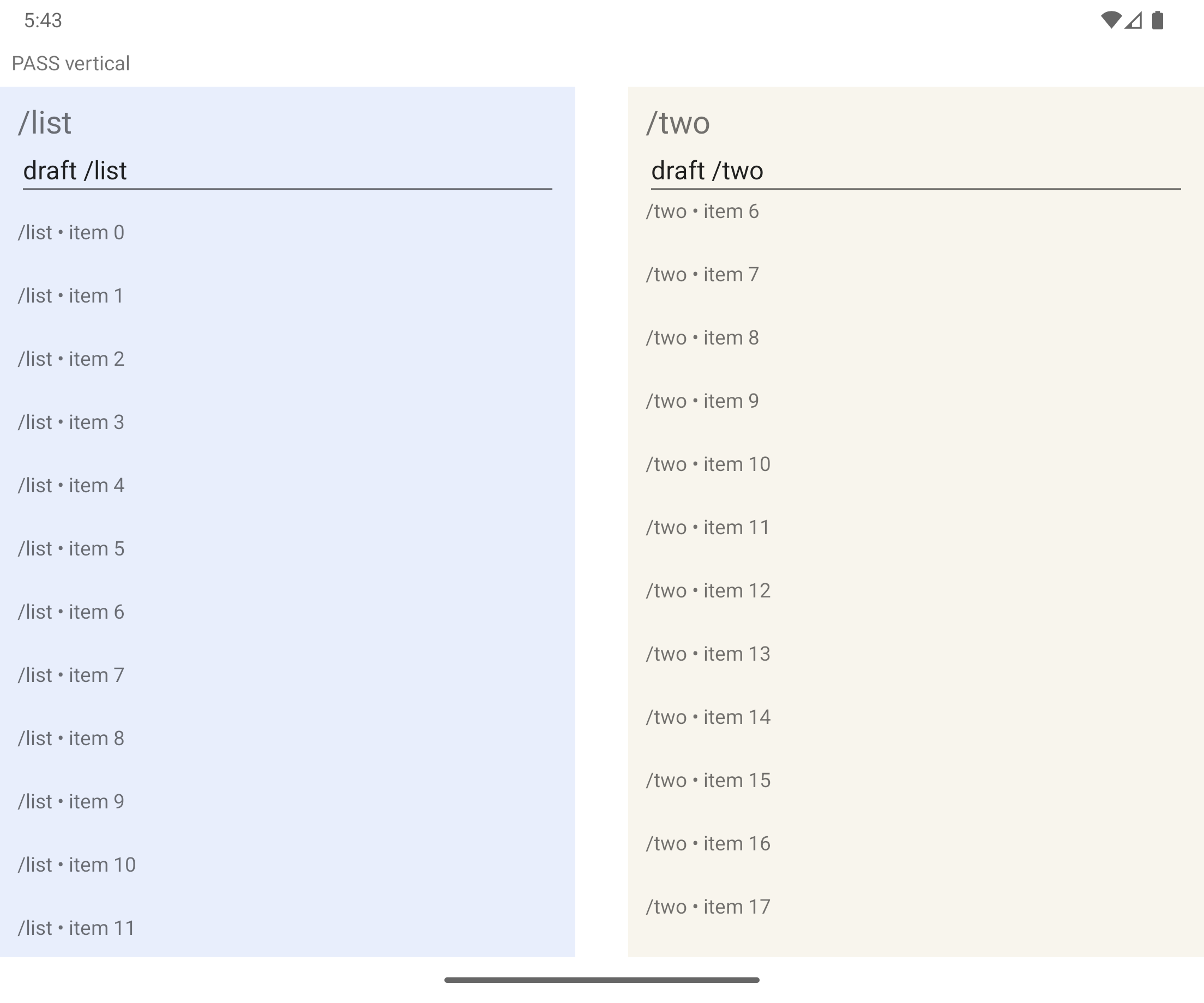
Android emulator: native panes leave the OS-reported hinge area empty.
Install the optional AndroidX Java callback bridge in App_Resources/Android/app.gradle:
dependencies {
  implementation 'androidx.window:window-java:1.5.1'
}
Rebuild the native app after adding the dependency. For RTL, enable android:supportsRtl="true" on the Android manifest's <application>, as for other native Android layouts. foldAware defaults to true; when the bridge is available, each mounted split view observes WindowLayoutInfo from its own Activity. It removes the listener when unloaded or unmounted and subscribes again when loaded. No process-wide foreground Activity or device-model heuristic selects its owner.
A separating fold or fully occluding hinge takes precedence over breakpoint and listWidth. A vertical feature places the list and detail in the two physical regions; the list is on the right in RTL. A horizontal feature places the list above the detail. The gap excludes the hinge, with outward rounding for NativeScript's integer grid lengths. A view intersecting only one usable side keeps both Frames in that side, using compact navigation.
A flat, nonseparating, non-occluding fold does not change layout. Without a relevant feature, without the optional dependency, and on iOS, the usual width-based layout applies. To opt out explicitly:
<RouterSplitView list="/messages" :foldAware="false" />The same Frames and Pages survive posture changes; navigation history, drafts and scroll state stay attached to their original entries. The empty slot occupies the detail region. This is a two-pane layout for a single intersecting folding feature, not Android Activity embedding or an additional native window. The containing app still owns its Android configuration-change and process-restoration policy.
Native evidence and reproduction commands are in foldable validation. See also AndroidX WindowManager and FoldingFeature semantics.
History and back
History works the same in both layouts. Selecting another item with push() adds a detail; it does not discard the previous selection. Given:
/messages → /messages/42 → /messages/42/editBack first returns to /messages/42, then to the list. In the expanded layout, that last back clears the detail column. Native back and router back stay in sync, and leave guards can prevent pages from being removed.
push(list)andbackToRoot()return to the existing list through the guards.replace()replaces the top detail. At the list, it opens the first detail.clearHistory: trueclears the detail history and keeps the list.setStack()keeps the list as the first entry, prepending it when omitted.pushForResult()returns results from details or modals as usual.restoresaves and restores the combined list/detail history as one named stack.backToRootOnReselectworks inside aTabViewItem, like onRouterView.
Native behavior
The list and detail each use a native Frame. A transparent native root in the detail Frame provides its back destination; this implementation detail never appears in router.stack or saved state. Compact mode places the detail Frame over the list; expanded mode places it alongside. Pages are never transferred between Frames during resizing.
The first detail opens across panes, so shared-element and iOS zoom transitions from the list are not used there. Transitions between detail pages work normally, including Android predictive back previews. Returning from the first detail to the list uses the Frame's normal back transition.
name and list are read when the component mounts. To create a different split stack, mount a new component with a different Vue key.
Opt-in UIKit columns
Use RouterUIKitSplitView as the root of the native window to let UISplitViewController manage primary/secondary columns. It requires iOS 18 or later and Core's SplitView; the tested Core version is 9.1.3. Choose the existing adaptive component on Android or when embedding a split inside tabs or another layout:
<script setup lang="ts">
import { supportsUIKitSplitView } from 'vue-router-ns'
const nativeColumns = supportsUIKitSplitView()
</script>

<template>
  <RouterUIKitSplitView
    v-if="nativeColumns"
    name="inbox"
    list="/messages"
    :primaryWidthFraction="0.32"
  />
  <RouterSplitView v-else name="inbox" list="/messages" />
</template>
The router plugin registers both components. Each uses the same route table, native Pages, guards, results and saved stack format. The choice is made when creating the window; it is not a runtime switch between mounted stacks.
UIKit owns collapse/expansion and its system sidebar controls. Expanded columns use UIKit’s tiled layout. primaryWidthFraction is a preferred fraction of the available width, subject to UIKit's constraints. Showing or hiding the primary column changes presentation only: selecting an item still calls push(), adds a detail and preserves previous selections. Back returns through those details and finally clears the detail column. Native Back, guarded dismissal, modals and restore retain the history semantics described above. Column adaptation keeps the same Pages and their local state.
For actual iPad window resizing, allow multitasking in App_Resources/iOS/Info.plist and support all iPad orientations:
<key>UIRequiresFullScreen</key>
<false/>
Full-screen compatibility mode can scale an app's surface without giving it a smaller UIKit window. See the native acceptance matrix and reproduction commands for the distinction and tested versions.
This component exposes name, required list, and primaryWidthFraction (default 0.32). Its empty detail is blank; it has no empty slot, breakpoint, supplementary or inspector column. It must own the window root: do not wrap it in RouterDrawer, RouterTabs, a Page or another layout. The primary column is the sidebar for this window; use RouterDrawer separately for an Android layout. The existing RouterSplitView remains available on both platforms.